
Stolen credentials from data breaches are being tested against live Microsoft Entra ID tenants using a technique that does not generate a sign-in event. For MSPs managing multiple tenants, this means attackers may already know which accounts in your clients' environments have valid, working credentials -- with no visible record of the verification in standard Entra ID logs.
Two large-scale campaigns exploiting this technique have been confirmed in 2026, targeting millions of Microsoft 365 accounts across thousands of tenants. The technique is named OAuth Client ID Spoofing.
The method works as follows. Attackers POST authentication requests directly to Microsoft's OAuth 2.0 token endpoint using the Resource Owner Password Credentials (ROPC) flow, a legacy authentication method designed for older applications that cannot use browser-based sign-in. Instead of a registered application, attackers submit randomised, spoofed client IDs with each request.
Microsoft Entra ID processes each request and returns one of three error codes:
Attackers read these responses to sort a stolen credential list into confirmed valid, invalid, and active-and-correct combinations. No authentication is completed. No session is created. No MFA prompt is triggered.
Because a spoofed client ID is used, the application name field in Entra ID sign-in logs is blank. Standard detections tuned to watch for surges in sign-ins against a named application do not fire.
Confirmed campaigns in 2026:
UNK_pyreq2323 (January to March 2026): Used over 700,000 spoofed client IDs from AWS infrastructure. Targeted more than 1 million accounts across approximately 4,000 tenants. Approximately 28% of targeted users were locked out due to failed attempts triggering account lockout policies.
UNK_OutFlareAZ (December 2025 onward): Used 3.7 million randomised spoofed client IDs from Cloudflare infrastructure. Targeted over 2 million users.
This technique does not require an attacker to complete a sign-in or bypass MFA. Validating which credentials from a stolen list are live and correct is operationally useful on its own. Those accounts become high-confidence targets for follow-on attacks: session hijacking, AiTM phishing, business email compromise, or targeted device code phishing.
ROPC is a legacy authentication flow. It bypasses the browser-based sign-in flow entirely, which means no Conditional Access policy evaluates the request in the standard way. In most Microsoft 365 tenants, ROPC remains available by default. A Conditional Access policy that blocks legacy authentication closes this path -- but only if it is actually enforced.
The scale of the confirmed campaigns indicates this is not targeted. Attackers are running these requests opportunistically against any reachable Microsoft 365 environment.
For MSPs managing multiple tenants: the exposure exists per tenant, independently. A legacy auth block on one tenant provides no protection for others.
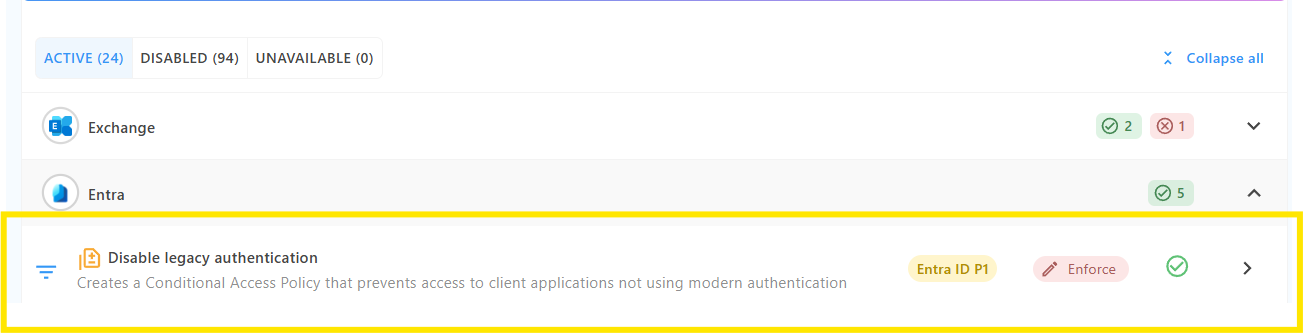
Review Conditional Access policies for a rule targeting "Other clients" and blocking legacy authentication clients. Confirm the policy is in enforced mode, not report-only, and that it applies to all users and all cloud apps without unintended exclusions.
Service accounts, shared mailboxes, and legacy device exclusions are common sources of unintended ROPC access. An exclusion that appears reasonable in isolation can leave a usable authentication path open.
Confirm the legacy auth block is enforced in every managed tenant. Each tenant requires its own policy. Multi-tenant MSPs cannot rely on a policy applied to one tenant carrying across to others.
Note on licensing: Blocking legacy authentication via Conditional Access requires Entra ID P1 or Microsoft 365 Business Premium. Tenants with Security Defaults enabled already have this protection in place. Tenants without P1 and without Security Defaults cannot apply this control without a licence upgrade -- Overe will flag this where it applies.
(Advanced): Review Entra ID sign-in logs for existing activity
For operators with direct access to Entra ID authentication telemetry, filter sign-in logs for: client app set to "Other clients", application name blank or empty, and failure codes in the AADSTS50034 or AADSTS700016 range. Review for volume anomalies against accounts that appear in known breach datasets. Overe customers can contact us directly for guidance on how to surface this potential activity.
Configured does not mean enforced.
A legacy auth block configured in the Entra ID policy editor does not guarantee that ROPC authentication requests are blocked. Exclusions, policy overlap, and edge cases in authentication paths can leave legacy auth accessible in tenants where the block appears to be in place.
Overe Conditional Access Assurance validates whether the legacy auth block is consistently enforced across real authentication flows - not just whether the policy exists in the Entra ID console.
Overe also includes a dedicated Harden control to block legacy authentication via Conditional Access, applied in enforced mode or monitoring mode with scoped exclusions where legacy authentication is operationally required. Overe Monitor surfaces risky sign-in activity and alerts on Conditional Access policy drift and exclusion gaps across managed tenants -- so if a policy changes state or an exclusion widens and reopens a previously closed authentication path, you find out before an attacker does.
